eero wifi system
- 4.8
- Rating
- 5.00M
- Installs
- Free
- Price

 Analysis by App-foxy
I came away from using eero wifi with a fairly clear impression: it is less about giving technical users endless controls and more about making a home network feel manageable. That distinction matters. The app is free to install and sits in the Lifestyle category, but its real purpose is practical—helping people set up, monitor, and live with an eero network without turning every connection problem into a visit to a router settings page.
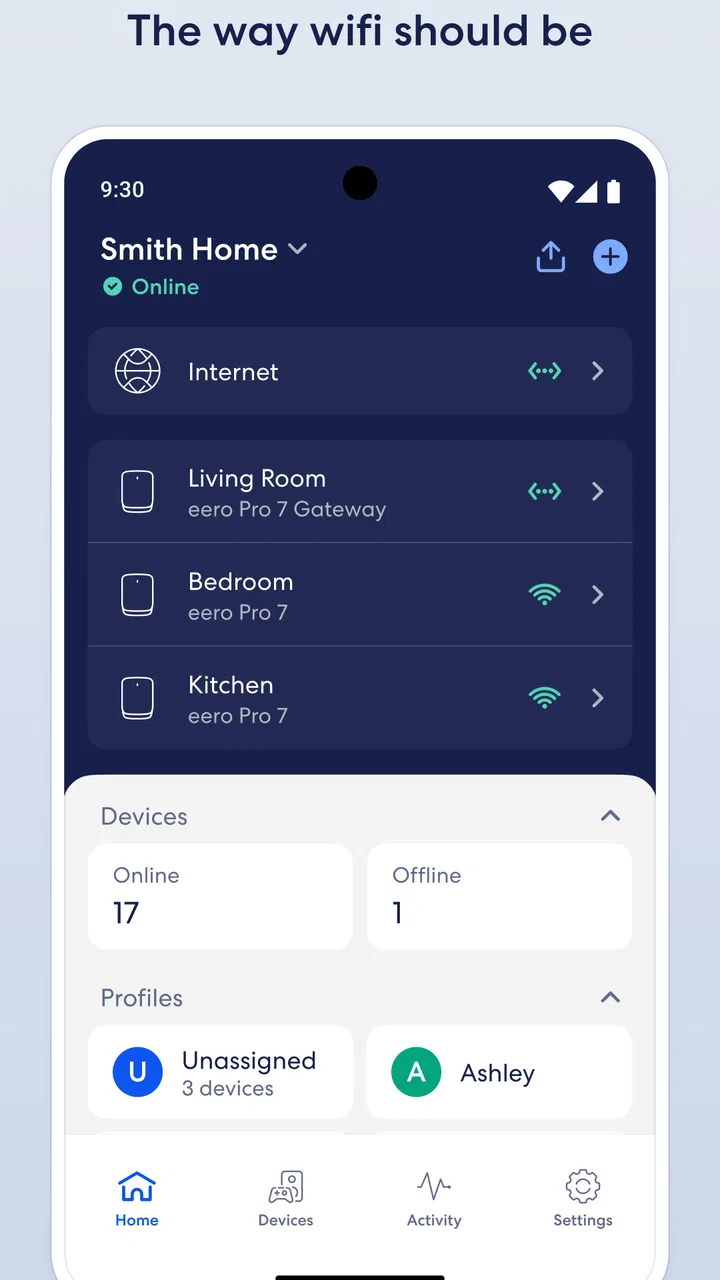
My strongest reason to recommend it is the way it brings the home network into an approachable mobile experience. Instead of treating Wi-Fi as a box hidden near a wall, the app gives you a place to understand what is happening across the home. The result is especially useful in households where several people connect phones, televisions, computers, speakers, cameras, and other devices at the same time.
That convenience does come with a trade-off. If you enjoy detailed network configuration, unusual routing setups, or fine-grained control over every technical setting, the eero approach may feel restrained. I would not choose it simply because it is popular. I would choose it when reducing everyday Wi-Fi friction matters more than experimenting with advanced networking.
You May Also Like

 Blood Strike: 2.5 Anniversary
Blood Strike’s Loadouts Turn Every Drop Into a Tactical Gamble
A close look at Blood Strike’s custom loadouts: how fast access to signature weapons reshapes its battle royale rhythm, rewards preparation, and narrows the gap between fights.

 Pandora - Music & Podcasts
Pandora’s Music Is Easy to Start, but Harder to Recover
Pandora’s strength is its low-effort path from a seed to a station. Its weak spot is how much confidence it asks you to place in connection, setup, and quiet recovery.

 8 Ball Pool
 Is Built on Rivalries, Rematches, and Routine
A close look at the rivalries, rematches, shared routines, and unanswered safety questions that turn a quick pool match into a persistent mobile community.

 Samsung Music
’s Quiet Strength Is Playing What You Already Own
Its reach comes less from spectacle than from dependable access to a personal library. That simplicity is both the app’s strongest retention engine and its ceiling.

 AccuWeather: Weather Radar
AccuWeather Review: A Quick, Clear Forecast for Everyday Decisions
For everyday plans, the best forecast is the one you can understand quickly. AccuWeather makes rain timing, radar, and local conditions easy to act on, with a few trade-offs.

 Hill Climb Racing
Why Hill Climb Racing Still Turns Crashes Into One More Run
A tiny car, a bumpy hill and one more upgrade: Hill Climb Racing keeps resurfacing because its simple chaos makes every near-miss feel personal.
More From Our News Desk



What using the app feels like in an ordinary home
The first thing I noticed is that the app is designed around decisions a normal household actually makes. You are not expected to understand every networking term before you can get started. The setup experience focuses attention on the network itself and the devices using it, which makes the process less intimidating than configuring a traditional router through a dense browser interface.
That simplicity is not just cosmetic. A home network often fails socially before it fails technically: someone cannot connect a new device, a video call becomes unreliable, or a visitor asks for the Wi-Fi details while the person who manages the router is away. A mobile control point makes those moments easier to handle because the network is represented in the same device most people already carry.
I also found the app more useful when I treated it as an ongoing household tool rather than a one-time installer. Checking the network after adding a new device, looking at which parts of the system are active, and using the app as the first place to investigate a complaint all create a more orderly routine. That is a small change, but it can prevent the familiar cycle of unplugging equipment at random and hoping for the best.
A realistic example is a family evening when one person is watching television, another is working from a laptop, and children are using phones in different rooms. If the connection feels uneven, the app gives the person responsible for the network a clearer starting point than walking around the house restarting equipment. It does not remove every possible cause of a problem, but it turns a vague complaint—“the Wi-Fi is bad”—into a more focused check of the home setup.
The strongest part: making a distributed network understandable
The app works best when the home uses more than one eero unit. In that situation, the important question is not only whether the internet connection exists, but how the home network is organized from room to room. The app provides a central view of that arrangement, which is much easier to understand than separate pieces of hardware with unrelated controls.
This is where eero differs from the usual single-router experience. A conventional router may offer a large number of settings, but the user is often left to interpret them alone. With eero, the mobile interface is the main doorway to the system. I see that as a strength for people who want a consistent experience across the home and do not want to become their household’s unpaid network engineer.
The developer, eero LLC, has clearly aimed the product at that middle ground between “plug it in and forget it” and “manage every setting manually.” The app is not merely a remote switch for hardware. It encourages you to think of the network as one connected system, which is a more useful mental model when coverage and device movement matter.
Another practical benefit is that the app keeps network management close at hand. When a problem happens in the evening or while you are away from the equipment, having a phone-based control center is more convenient than searching for a computer, finding the router address, and remembering an administrator password. That does not guarantee a fix, but it improves the first response.
Useful habits that are easy to overlook
One of my favorite ways to use the app is as a troubleshooting log in miniature. When someone reports a problem, I first check whether it affects one device or the whole home. If only one device is struggling, I avoid immediately blaming the internet service or restarting everything. That simple distinction can save time and reduce unnecessary disruption for everyone else.
A second useful habit is checking the network after changing the physical layout of a room. Moving a television, placing a large appliance nearby, or closing doors that were previously open can change how a wireless signal behaves. The app cannot make walls disappear, but it gives you a practical place to reassess the network rather than assuming the old arrangement still works perfectly.
A third insight is that a mesh system should be planned around how people use rooms, not just where the internet enters the house. I would think about work areas, bedrooms, entertainment spaces, and places where devices are regularly used. The app becomes more valuable when the hardware locations reflect those habits. If the units are placed only because a power outlet is convenient, the software cannot fully compensate for a poor physical plan.
There is also a useful distinction between coverage and service quality. A phone may show a strong connection to the local network while the internet connection from the provider is having trouble. The app helps you examine the home side of the arrangement, but it should not be treated as proof that every slowdown originates inside the house. When diagnosing issues, I would compare several devices and several rooms before deciding what needs attention.
Where the streamlined approach becomes a limitation
The same simplicity that makes the app friendly can frustrate experienced users. People who want a broad collection of manual controls may find the experience less satisfying than a traditional router interface or a more enthusiast-focused networking platform. I prefer not to call that a flaw in every situation; it is a deliberate exchange. The app gives up some complexity in order to make common tasks easier to approach.
That trade-off becomes important if your home depends on specialized network arrangements. Anyone who needs unusual routing behavior, highly specific segmentation, or a deep set of diagnostic tools should investigate compatibility before committing to this ecosystem. I would not buy the hardware first and assume the app will accommodate every advanced requirement afterward.
There is another practical consideration: the app is most compelling when paired with eero equipment. If you are only looking for a general Wi-Fi analyzer or a universal router-management tool, this is not the right category of solution. Its value comes from being the control surface for an eero-based home, not from replacing every networking utility on a phone.
The presence of optional purchases also deserves attention. The app itself is free, while in-app items range from less than a dollar to nearly three hundred dollars. That wide range means I would read each purchase description carefully and decide whether an optional feature or service addresses a real need in my household. Free installation should not be confused with every possible capability being included at no cost.
I also would not expect the app to solve physical or service-provider problems by itself. A poorly positioned unit, a damaged cable, a congested environment, or an outage outside the home still requires a different response. The app can organize the investigation, but it cannot turn an unsuitable location into an ideal one or repair an external connection.
Who will get the most from it
I think this is a strong fit for households that want a calmer way to manage Wi-Fi. It suits people who are comfortable using a phone but do not want to learn router administration, families that need a shared view of the network, and anyone replacing a single router because different rooms receive inconsistent coverage.
It is also a good match for a person who has become the default technology helper at home. The app gives that person a repeatable workflow: identify the affected device, check the network view, consider whether the issue is local or external, and only then move toward more disruptive steps. That is more useful than collecting disconnected troubleshooting tips in a notebook.
The Everyone content rating makes the app approachable for a broad household audience, although the person managing the network should still understand what changes they are making. A simple interface does not mean every decision is consequence-free. Changing network arrangements can affect other people’s devices, so I would make adjustments at a quiet time rather than during an important call or a family movie.
I would be more cautious about recommending it to a networking hobbyist who enjoys comparing firmware behavior, manually tuning every radio option, or building a highly customized home lab. That user may prefer a platform that exposes more of the underlying system. I would also point elsewhere if the main goal is monitoring networks that are not built around eero hardware.
How it compares with the usual alternatives
Compared with a standard internet-provider router, the eero experience feels more intentional and less dependent on a browser-based administration page. The provider’s equipment may be perfectly adequate for a small apartment with modest demands, especially if cost and simplicity are the only priorities. The reason to consider eero is not that every traditional router is bad; it is that a coordinated system can be easier to manage when the home has awkward coverage or many active devices.
Compared with advanced third-party router apps, eero is more approachable but generally less appealing to someone who wants a dashboard full of technical detail. A specialist tool may provide more information and more knobs, but that information can become a burden for the person who simply wants the living room and bedroom to remain usable. I would choose based on whether control or convenience is the higher priority.
Compared with standalone Wi-Fi analysis apps, eero is less universal. An analyzer can be useful for examining wireless conditions around many kinds of equipment, while this app is tied to managing an eero network. That narrower focus is exactly why it feels coherent when you own the matching system, and exactly why it makes less sense as a general-purpose download.
Everyday questions I would ask before installing it
If you are wondering whether the app works for a home that is not technically minded, my answer is yes, provided the household is using compatible eero equipment and wants guided management rather than deep customization. You do not need to be a networking expert to benefit from the central view, but you should still be willing to think about where devices are used and how the hardware is placed.
If you are replacing an existing router, I would plan the change instead of treating it as a quick app download. Identify which devices depend on the current network name, choose a sensible time, and keep track of anything that may need to reconnect. The app can make the new arrangement easier to manage, but preparation prevents avoidable interruptions.
If you are concerned about whether the app is worth using when the Wi-Fi already seems fine, I would say its value depends on your household. A small home with one router and few devices may not gain much from a dedicated system-management experience. A larger or busier home can benefit even when the network is mostly reliable, because the app provides a clearer way to respond when conditions change.
If you are deciding whether optional purchases are necessary, I would start with the basic experience and only consider extras when you can name the problem they solve. The free app is the entry point, but the best value comes from matching any paid capability to a specific household need rather than assuming more features automatically mean better Wi-Fi.
Finally, if your problem is an internet outage from the provider, I would use the app to separate that possibility from an issue inside the home, then contact the provider when the evidence points outside your network. This distinction is important: a well-organized Wi-Fi system cannot restore a service that is unavailable upstream.
My final recommendation
eero wifi is a thoughtful choice for people who want home networking to feel less like a technical project. Its strongest quality is not a flashy feature; it is the way the app gives everyday users a consistent place to understand and manage an eero setup. I found that especially valuable for multi-room homes, busy families, and anyone who regularly becomes responsible for fixing connection complaints.
The limitations are equally clear. The app is not a universal network utility, and its streamlined design may feel too restrictive for advanced users. The hardware ecosystem matters, optional purchases need careful consideration, and software cannot compensate for poor placement or an external service failure.
The current version is 26.0.1.36753, and the app supports devices running iOS or Android version 9 and later. With an average rating of 4.8 from over a hundred thousand ratings, more than five million installs, and thousands of written reviews, it has earned broad adoption without changing the basic question a new user should ask: do you want an easier eero network experience, or do you want maximum technical control?
For the first group, I would recommend giving it a serious look. For the second, I would compare its limits with a more configurable networking platform before buying into the system. My overall verdict is positive because the app understands its audience and serves that audience well: it makes routine Wi-Fi management clearer, while accepting that advanced freedom is not its main goal.
FAQs for eero wifi system
01What is the eero WiFi system and how does it work?
The eero WiFi system is a mesh network solution designed to enhance your home internet coverage. It works by using multiple eero devices that communicate with each other to create a seamless WiFi network. This setup eliminates dead zones and ensures a stable connection throughout your home, providing faster and more reliable internet access.
02Is the eero WiFi system compatible with my existing internet service provider?
Yes, the eero WiFi system is compatible with most internet service providers (ISPs). It works by connecting directly to your modem. You can use the eero app to guide you through the setup process, ensuring a smooth transition and integration with your existing ISP.
03How easy is it to set up the eero WiFi system?
Setting up the eero WiFi system is straightforward and user-friendly. The eero app provides step-by-step instructions to guide you through the process. Most users can complete the setup in under 10 minutes, making it accessible even for those who are not tech-savvy. The app also offers ongoing support and troubleshooting tips.
04Does the eero WiFi system support parental controls and security features?
Yes, the eero WiFi system includes robust security features and parental controls. Through the eero app, you can easily manage internet access for various devices, set schedules, and filter content. Additionally, eero provides automatic security updates to safeguard your network against potential threats.
05Can the eero WiFi system handle multiple devices and high-bandwidth activities?
Absolutely, the eero WiFi system is designed to handle multiple devices and high-bandwidth activities such as streaming, gaming, and video conferencing. The mesh network optimizes internet speed and reduces buffering, ensuring that all connected devices maintain a strong and stable connection even during peak usage times.
Pros
- Seamless network coverage throughout home.
- Easy setup with user-friendly app interface.
- Automatic updates ensure latest security.
- Parental controls for safe internet usage.
- Compatible with Alexa for voice control.
Cons
- Requires a subscription for advanced features.
- Limited customization for tech-savvy users.
- Dependent on a stable power supply.
- Some features need a strong internet connection.
- Not compatible with all smart home devices.

eero wifi system
Gallery